Sunday, February 25, 2018

shadows and shading, massachusetts and california

i wanted to replace my old tree:

so i drew a new tree (with mouse in GIMP):


then i had to decide how to color and shade it:


i was not crazy about any of these. i showed them to my mom. we discussed. this was important, because i'm trying to settle on a visual style for all the environment that should work with my already drawn whale, dogs, blue hobbit folk, and monsters. plus it was to work with my weird, top down, two-layer world, the floating island layer and the flying creatures layer. i explained my frustration with not being able to simply transfer pen and paper drawings into my video game easily and how much i liked just drawing with a pen, like i did during so many college classes lol. somehow i started asking if we still had The Eleventh Hour, a beautifully illustrated book my sister had a child. i was heavily influenced by my sister's aesthetic tastes that were too girly for me to have in my room. (i feel the temptation to get derailed by a discussion of child rearing, gender roles, aesthetics, and sexism!!!!).

this is what that book's cover looked like:


my mom said it was upstair in the bottom right of the bookcase. so i tried to find it. instead, i found this:


which is funny. because i think of dr seuss and pd eastmann (Go, Dog. Go!) as my strongest influences for the look of flock of dogs and the general look anything i draw with a pen, in general. and so i was like, how does dr seuss do his trees!? and, well, The Lorax isn't very helpful either; my trees are not shaped like the truffula trees:


but then

i started reading about dr seuss on the internet, how he's from massachusetts, how he got banned from extra curricular activities during college for being caught drinking with friends in his room during prohibition. then in oxford getting his english phd he meets a new york gal who tells him to quit trying to be en english teach, be an arist, because the drawings he does in his notepad during class are absolutely delightful. so he does that and moves to new york, and marries her. his wife can't have kids, so they don't have kids. he writes books. gets popular. moves to california. then his wife gets pretty sick, and dr seuss then cheats on her with a married neighbor. so then mrs seuss writes this note:

"Dear Ted, What has happened to us? I don't know. I feel myself in a spiral, going down down down, into a black hole from which there is no escape, no brightness. And loud in my ears from every side I hear, 'failure, failure, failure...' I love you so much ... I am too old and enmeshed in everything you do and are, that I cannot conceive of life without you ... My going will leave quite a rumor but you can say I was overworked and overwrought. Your reputation with your friends and fans will not be harmed ... Sometimes think of the fun we had all thru the years ..."

she takes her own life. dr seuss said later, "I didn't know whether to kill myself, burn the house down, or just go away and get lost." he soon married the other woman and went back to work writing childrens book.

now, i guess, back to drawing trees for my video game. i shaded this one in the style of seuss:


and here it with leaves, fruit, and placed on a sky island:


rest in peace, ted and helen.

Tuesday, February 20, 2018

Sky Islands For Flying Dogs And Whales

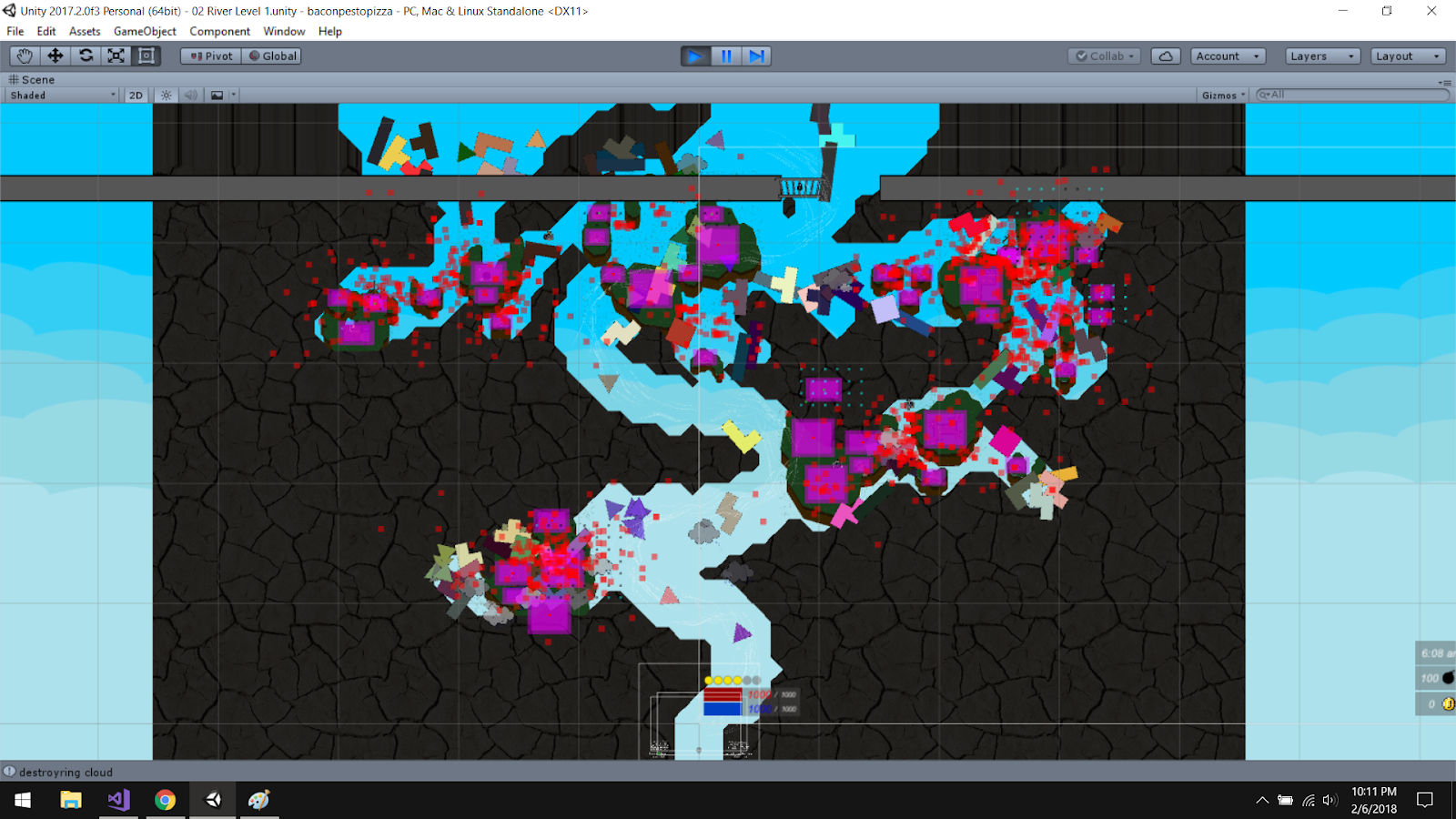
Here's some screenshots from when I was debugging my new island/building placement system. I have created about 20 islands that can then be flipped across the x or y axis, providing me with many extra island permutations. Then when I'm procedurally generating a level, it can attempt to place any of these islands underneath a building. It has to make sure it doesn't hit another island, and then if the island is placed, it then checks if there's other space left on it for the next buildings to be placed on it. It's all kind of a headache. What this doesn't show is how I carve the river out of the cavern in the first place. That was a great struggle solved long ago!
  • Red squares: failed island spawn attempts
  • Magenta squares: possible building spawns
  • Tiny green squaress: the corners of a building's 'placement collider' or area that needs to be accessible
  • Tiny teal/tiny black squares: the nearest map coordinates to the green points, going around perimeter, checking if inside cavern wall (teal) or not inside cavern wall (black)
  • Tiny yellow squares: points along building's placement collider's perimeter that are outside of map coordinates


This image has a lot of the debug stuff turned off, so you can see what's underneath.


Sunday, January 7, 2018

Mr Pink Just Won't Quit

Alright well. I'm done with my vacationing. I'm back in Nashville. Work work work until the Playthrough Gaming Convention on Feb 18-19.

I got a bit done in California. I got the torches working (see blog post below) and now players can quit the game (see gif below).


Wasn't too tricky and you can immediately rejoin. I don't allow players holding items or players encased in a crysal to quit, but you can be on dogback and quit. And it saves your dog (instantly docks the dog on the whale). So that's pretty gameable. Anyway.

Thinking more about how I want to do the overworld map. I lean towards an inverted ski trail map, also similar to like Star Fox 64. Green, blue, blacks, double blacks, some secret paths, some mid-mountain 'lifts', and some mid-mountain resting places. Maybe a ski patrol. Maybe a trick park. Maybe some out of bounds areas. Maybe some helicopter access only areas. Maybe some hike ups. Maybe some cross country routes. Maybe maybe maybe. So many ideas. Such self doubt.

Especially unsure about the ending of the map. Do the route options keep diverging, like a river delta?  So many possible exits or finishes, instead of one final position...seems unwieldy to me. So Star Fox 64 blooms out and then contracts back in, so you always end up at the same final destination. A real river that ends in a delta still typically all ends in the same body of water, but it's not like it's all at the same 'enemy base' or something.

Tuesday, January 2, 2018

Gamasutra Blog

Note: This is the post I've submitted to Gamasutra, reposted here.

********************************************************
********************************************************
********************************************************
********************************************************
********************************************************

Hello, my name is Max and I am afraid of shaders.

(Spoiler alert, this is not a tutorial on writing shaders.)

For many months, I've yearned to add torches to my sprite based 2D game. There's a bunch of solutions on the internet for writing shaders for this kind of thing, but I didn't see the exact solution I needed. And I'm a first time, solo dev without a programming background and my schedule has been pleasantly full with just learning C# and Unity and GIMP and Lightworks and making a website and blogging and doing #screenshotsaturday and pestering friends for music...all this without having to write nasty shaders. But! Now that Unity created the Sprite Mask component, I have got my brief candles working. Here's a photo from the final product or check out these gifs.


Once I figured out how to do this, it's almost trivial. However, since of course it took me a full day to figure out that trivial solution, and since Visual Studio is updating, I thought I'd write this blog.

MY PROBLEM:

Flock of Dogs is a top down, 2D, co-op game for up to 8 players locally. I wanted multiple, dynamic, light sources. To be specific, I wanted circles of light to emanate from the torch item when a player carried it. Moreover, I wanted multiple players to be able to carry torches and their light circles to play nicely when players moved and the circles overlapped. And maybe in the future, more things will be on fire and will move too. To be determined. This rules out the approach of a sprite overlay with a hole cut out, because as soon as you try to do two overlays, they each cover the hole of the other.

MY SOLUTION:

(1) I created Darkness! A screen-sized rectangle attached to my camera, a very deep purple/blue, with a bit of transparency.


(2) I put it on its own sorting layer, which I named Light, because darkness creates light. Right?

(3) Took my torch prefab and created a child on it with a sprite mask. Chose a circle sprite for its sprite. Scaled it up to a 20 radius. This didn't do anything except make a nice orange circle though!


(4) Went back to my darkness sprite, selected "Mask Interaction" dropdown, chose "Visible Outside Mask."


Ta-da.

(5) Now, it looked weird to me that the area that had been cut out from the darkness was perfectly clear and there was such an abrupt transition into the dark. So I duplicated the Darkness and changed its color to a mostly transparent dark yellow. I called it Haze! I set its Mask Interaction to none.


(6) For the fading, I duplicated the Darkness twice. I renamed the objects to DarkShadow and LightShadow and set their transparencies to like 40/255 (still on the Light sorting layer, sill with "Visible Outside Mask" turned on). This served to only darken the the Darkness, since the mask was still cutting through all them.

(7) Back on the torch, I duplicated the sprite mask child twice as well. Renamed them to DarkShadowMask and LightShadowMask. Scaled DarkShadowMask to a 24 radius and LightShadow to a 20 radius.

(7b) I created a child object for my torch to hold the masks, Light.


(8) On the three masks on the torch, I checked "Custom Range" and chose these settings:

For the DarknessMask,
Front Sorting Layer: Light; Order in Layer: 0.
Back Sorting Layer: Light -1, Order in Layer: -1.

For the DarkShadowMask,
Front Sorting Layer: Light; Order in Layer: 1.
Back Sorting Layer: Light -1, Order in Layer: 0.

For the LightShadowMask,
Front Sorting Layer: Light; Order in Layer: 2.
Back Sorting Layer: Light -1, Order in Layer: 1.

This image is of setting the DarknessMask's Sprite Mask custom range.


(9) On the overlays, I set their sprite renderer's sorting orders to the following:

Haze: -1
Darkness: 0
DarkShadow: 1
Light Shadow: 2


Boom shakalaka.

(I also added a script on the torch to make the light flicker, but you can only notice that if you look at the gifs. If you wnat the script, message me.)

Torches

Happy New Year.

Visual Studio wasn't providing autocomplete and red underlining for one my files, which is weird. Normally, it happens such that autocomplte and red underlining stops working for all of my files, and I just restart Visual Studio. But restarting didn't fix it for my Trader.cs file, so I'm updating Visual Studio. Restarting laptop might have also worked. Who even knows. I didn't see a quick answer to my specific issue when googling. But anyway. This gives me time to blog!

Here's some gifs I made a few days ago:


Torches! This is excitng, because I've wanted dynamic lighting for like forever as an environmental interaction. This is difficult to do, because if you're going to have multiple lighting sources that aren't static, I couldn't see how you'd do that with simple sprite overlays. I didn't want to use shaders. But then Unity came out with a sprite mask component!!!!! Yaya.

You know, I wonder if I could write a good blog about how I did this and get it onto gamasutra.com...you know, have the millions of gamasutra readers notice my game! Oh and help people. I'm going to try it!

Thursday, September 28, 2017

Feeling Mopey? Get Moppy.

You know how sometimes you're not sure if life is worth living any more and then you clean the kitchen and you feel super proud of yourself and are convinced of your own virility. Kinda like mopping a whale.


The way mopping presently works is that your mop does 1 damage to each pair of footprints that it hits when you do a mop 'swipe'. Now, if your mop is wet, it does like 3 or 5 damage or something to the dirty footprints. These footprints come from players walking around on the back of the whale, by the way. Whenever a footpring is left or when it is mopped up, the whale checks the total number of footprints on its back. If it it's less than 20 or something, it is clean. Greater than 20, mildly dirty and the entire whale sprite gets tinted brown and there is a drag applied to any players walking on the whale's back. If there are more than 40 footprints (now that's a dirty whale!), the whale is considered quite dirty and is tinted an even darker shade of brown and even more drag is applied to players trying to waddle through the muck on deck. So what's depicted above is the lonely red player working all by himself to fly the whale into a nearby rain cloud and giving the whale a bath (and a drink, incidentally). Also, when you get the hose attachment for the whale, which can be used to spray down thirsty dogs, attck fire based enemies, put out fires on burning buildings, it can be also used to manually wet the whale deck, instead of needing to locate a rain cloud or to use drop mops. 

Mopping has been in the game a long time, but I felt like talking about it today. It serves a few design purposes. (A) I think it would be great to hear about how a group of friends struggled with the decision to upgrade their mops or their guns. (B) general upkeep task that requires time, competes for resources (water), and affects general gameplay (the drag as you walk on a dirty whale is not insiginficant, especially when you're carrying the heavy sack of dog food). (C) provides another motivation for finding rain clouds. Now, where I think it could perhaps use some refinement is in the visual communication department.  People don't notice the footprint specks and/or realize you have to mop up the specks specifically, rather than just the whale in general. I think having to target the footprints is important, because forcing the player to move around, get in the way of other players, and also leave more footprints while mopping, makes the activity more nuanced and more interesting as its own little minigame. And also, just mopping the fin over and over doesn't seem like that should count for cleaning the whale (however, it doesn't seeem like 20 footprints left only on the nose should dirty up the whole whale either...oh well). 

Just because you're curious, I'll also let you know that it used to be designed so that only when you walked through a footprint speck did you feel the drag. I basically decided against this, because while I want it to feel bad when you're moving slowly because it's a dirty whale, the stop and go of hitting dirty footprints felt more buggy than an intentional mechanic. Maybe this is because it's generally difficult to see the footprints, especially just one or two, especially when they're underneath your player sprite. With a whale-wide state of drag corresponding to a state of dirtiness as visually communicated by whale color tinting, at least you know what's happening, if you know how mopping and leaving footprints functions in general. Anyway, people think the dirtiness of the whale is indicating damage though. So I don't know. Maybe I'll just adds a bunch of blood splurting out all over the place for when the whale takes damage.

Tuesday, September 26, 2017

Bro and BFIG, Barnacling and Bullet Splattering

BFIG has come and gone. Kevin and Courtney are up and married. And I remain. In Starbucks. With my empty fruit and yogurt parfait cup.

My step bro, Matt Borchert, ran my booth at BFIG. And! He also has provided some music for the game. Anyway. BFIG seemed cool for the 1.5 hrs I was there, (before I left for Kevin and Courtney's wedding) before any attendees showed up. And I heard it continued being very cool all day. One of the coordinators and leader of the Game Makers Guild, Tim Blank, said that BFIG had perhaps a BFIG record attendance and he hadn't heard one negative statement about it. I put in a lot of effort getting the introductory/demo level working and figuring out the flow of introducing how to ride a flying dog, how to pilot a flying whale, how to heal injured dogs by feeding them them from the food sack, how to heal the whale by feeding it from the fruit tree, how to attach whale attachments, how to mop the whale, how to store gems in the belly of the whale, how to enter the belly of the whale to get your gems back and/or anything the whale has swallowed, how to use keys, how to shop, how to sleep in a bed together...anyway. Some of those things are taught much more clearly than others. But about a million things that used to go wrong don't go wrong. But it's kinda like when you hear about how a hand sanitizer cleans like 99.99% of bacteria and then realize that the remaining bacteria, that .01% accounts for like millions of little entities out there, trying to survive, placing its life before yours...willing to do whatever it takes.

Apparently, people still get stuck in walls. And sometimes you get flooded with oodles of dogs. Harpoons stick into things they shouldn't. Playeres somehow walk off the whale and just trot around in the air, leaving dirty foot prints everywhere, that people don't understand what use it is in mopping them up, and also, a giant black square will appear sometimes. And players don't know what to do with empty sacks of dog food (the answer is to toss them out, which is littering, and before you get upset and start forcing your own own moral predilections onto Flock of Dogs, it's definitely unclear what is or isn't biodegradeable or what kind of sustainability is possible really in this world).

While Flock of Dogs didn't win the curator chosen award for Multiplayer/Connected Gameplay (not surpring, the build I submitted in May was wildly buggy, visually unclear, and had a laughable tutorial), Matt said we did get a lot of attendees votes for game of the show. Flock of Dogs didn't win that either, but that's ok. The winning game (http://nextgenpants.com/refactor/) and many of the competing games have a much more public profile, bigger teams, and are much further along in the development. Actually, many had already been released.  And maybe it's ok to not be a winner? It would be nice to see how many attendee votes other games received or even get an exact number for how many Flock of Dogs received. Matt collected a bunch of emails of people interested in the game, so I guess I'll have to write a newsletter soon.

Anyway, I made some new particle effects leading up to BFIG, which is some of the only new visual polish the game has received in a while, so I'll share that with ya:


See how the bullets splatter? Jawesome. I also made the destructible environment have some particle effects and also split in to smaller pieces  instead of just disappearing. This is in accordance with the principle of 'barnacling' where, in nature, when there's large things, there's usually some medium sized things near it, and some small sized things near those. It still doesn't have a sound effect.


The simle, blended color gradients that generate when I take the base color of either the giant, floating tetrominoes or the players' bullets' colors, then choose 3 other colors that have slight, random variations in their RGB values absolutely thrill me. I'm also now going to try stockpiling gifs and start posting them to  Twitter for #screenshotsaturday in the future.

This is part of my whole plan of, you know, telling people about my game and maybe even letting them play it. I told a few people I'd send them access to a playable version of the game. One guy even said he wanted to play it for his YouTube channel. Craazy.